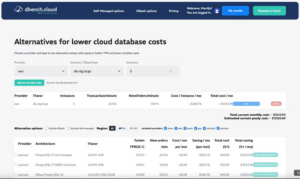
Cloud database cost-calculator
Getting the best database performance for your cloud spend is no longer about “picking a bigger instance” on AWS, Azure, or GCP—it’s about having the skills to actually reach the full bandwidth and IOPS you’re paying for.
𝗦𝗸𝗶𝗹𝗹𝘀 𝘁𝗵𝗮𝘁 𝘂𝗻𝗹𝗼𝗰𝗸 𝗽𝗲𝗿𝗳𝗼𝗿𝗺𝗮𝗻𝗰𝗲 𝗽𝗲𝗿 𝗲𝘂𝗿𝗼/𝗱𝗼𝗹𝗹𝗮𝗿
On all three hyperscalers, the default settings rarely use the full disk, network and CPU capabilities of the platform.
• Cloud storage literacy: knowing how to size storage for IOPS and throughput instead of guessing from instance types alone.
• Network and topology awareness: designing AZ/region placement to avoid cross‑zone latency and hidden data transfer costs.
• Database‑centric OS tuning: getting queue depth, filesystem options and instance families right so your engine can actually consume the IOPS and bandwidth you’ve provisioned.
• Workload‑relevant benchmarking: using tools like HammerDB TPROC‑C to measure “transactions per minute per euro/dollar”, not just vCPUs on a pricing page.
Teams that build these skills routinely see 2–5x better performance per unit of spend—without changing a single line of application code.
𝗪𝗵𝘆 𝗶𝘁’𝘀 𝘄𝗼𝗿𝘁𝗵 𝗹𝗼𝗼𝗸𝗶𝗻𝗴 𝗯𝗲𝘆𝗼𝗻𝗱 𝘁𝗵𝗲 𝗯𝗶𝗴 𝘁𝗵𝗿𝗲𝗲
Once you can read performance and cost this way, you’re no longer limited to the defaults on AWS, Azure, and GCP.
• You can seriously consider managed platforms and alternative clouds that give you full bandwidth and IOPS from day one, instead of weeks of tuning just to reach the numbers on the marketing sheet.
• You start comparing “throughput per euro/dollar” and “latency at p95/p99” instead of brand names and instance families.
𝗨𝘀𝗲 𝗗𝗕𝗲𝗻𝗰𝗵.𝗰𝗹𝗼𝘂𝗱 𝘁𝗼 𝗰𝗼𝗺𝗽𝗮𝗿𝗲
The real challenge is comparing all of these options on equal footing.
That is where DBench.cloud comes in: https://dbench.cloud
• Benchmark self‑managed and managed PostgreSQL architectures across AWS, Azure, GCP and alternative providers using the same HammerDB workloads.
• Use the cost calculator at https://dbench.cloud/costcalculator to see which setups deliver the most throughput per euro/dollar for your workload profile.
🎥 Watch the demo‑video for compares here: